
3.1.1. SUEWS Quick Start Tutorial#
This tutorial demonstrates the essential SUEWS workflow using the modern SuPy (Python) interface:
3.1.1.1. What is SUEWS?#
SUEWS (Surface Urban Energy and Water Balance Scheme) is an urban climate model that simulates energy and water fluxes in urban environments. SuPy is the modern Python interface that provides powerful data analysis capabilities and seamless integration with the scientific Python ecosystem.
Key Benefits of SuPy: - Modern YAML configuration: Type-safe, hierarchical parameter organization - pandas integration: Powerful data analysis and visualization - Scientific Python ecosystem: Works with NumPy, matplotlib, Jupyter notebooks - Built-in sample data: Start immediately without complex setup
3.1.1.2. Installation#
Install SuPy with one command:
pip install supy
3.1.1.3. Before We Start#
Load the necessary packages:
[1]:
import matplotlib.pyplot as plt
import supy as sp
import pandas as pd
import numpy as np
from pathlib import Path

%matplotlib inline
[2]:
sp.show_version()
2025.11.19.dev7
3.1.1.4. Load Sample Data#
SuPy includes built-in sample data to get you started immediately. This is the recommended approach for learning SUEWS and testing functionality.
3.1.1.4.1. Recommended Approach: Built-in Sample Data#
Load sample data for immediate simulation. This approach provides built-in test data and configurations, perfect for learning and testing:
[4]:
# Load built-in sample data using modern OOP API
from supy import SUEWSSimulation as ss

sim_sample = ss.from_sample_data()

# Extract state and forcing for examination
df_state_init = sim_sample.state_init
df_forcing = sim_sample.forcing

# Examine the sample data
print(" Sample data loaded successfully!")
print(f"Grid ID: {df_state_init.index[0]}")
print(f"Forcing period: {df_forcing.index[0]} to {df_forcing.index[-1]}")
print(f"Time steps: {len(df_forcing)}")

# For demonstration, use one year of data
df_forcing = df_forcing.loc["2012"].iloc[1:]
grid = df_state_init.index[0]
2025-11-19 23:45:56,771 - SuPy - INFO - Loading config from yaml
 Sample data loaded successfully!
Grid ID: 1
Forcing period: 2012-01-01 00:05:00 to 2013-01-01 00:00:00
Time steps: 105408
A sample df_state_init looks below (note that .T is used here to produce a nicer tableform view):
3.1.1.4.2. Alternative: Complete Simulation in One Step#
For even simpler usage, you can run a complete simulation with sample data in one command:
Run complete simulation with sample data in one step
sim = SUEWSSimulation.from_sample_data()
sim.run()
df_output, df_state_final, df_forcing = sim.results, sim.df_state_final, sim.df_forcing
This approach is ideal for: - Quick testing and demonstration - Learning SUEWS output structure - Benchmarking performance
For this tutorial, we’ll use the step-by-step approach above for better learning
3.1.1.4.3. Understanding the Input Data#
SUEWS requires two main input datasets:
3.1.1.4.3.1. df_state_init - Initial Conditions and Site Configuration#
df_state_init contains: - Surface characteristics: albedo, emissivity, land cover fractions, building heights - Model configuration: physics options, time stepping, output settings
For complete variable descriptions, see Input Data Structures
[7]:
df_state_init.loc[:, ["bldgh", "evetreeh", "dectreeh"]]
[7]:
| var | bldgh | evetreeh | dectreeh |
|---|---|---|---|
| ind_dim | 0 | 0 | 0 |
| grid | |||
| 1 | 22.0 | 13.1 | 13.1 |
[8]:
df_state_init.filter(like="sfr_surf")
[8]:
| var | sfr_surf | ||||||
|---|---|---|---|---|---|---|---|
| ind_dim | (0,) | (1,) | (2,) | (3,) | (4,) | (5,) | (6,) |
| grid | |||||||
| 1 | 0.43 | 0.38 | 0.0 | 0.02 | 0.03 | 0.0 | 0.14 |
3.1.1.4.3.2. df_forcing - Meteorological Forcing Data#
df_forcing contains time series of meteorological variables that drive the urban climate simulation.
For complete variable descriptions, see Input Data Structures.
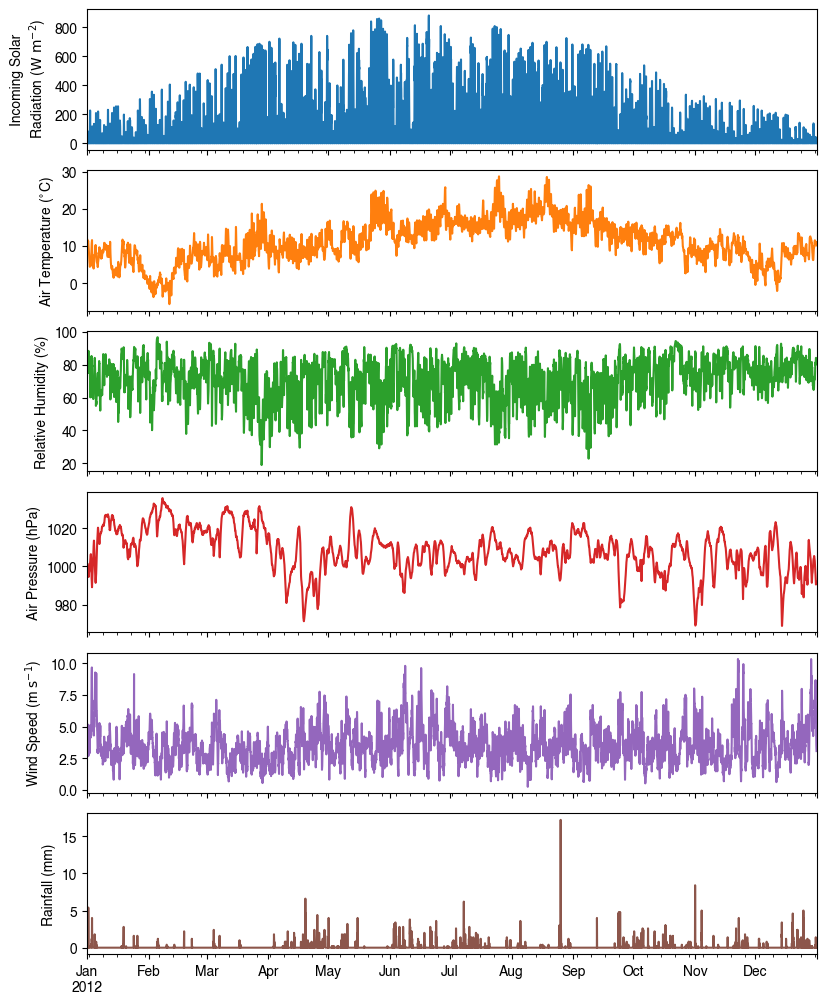
Below is an overview of the key forcing variables in our sample dataset:
[9]:
list_var_forcing = [
    "kdown",
    "Tair",
    "RH",
    "pres",
    "U",
    "rain",
]
dict_var_label = {
    "kdown": "Incoming Solar\n Radiation ($ \mathrm{W \ m^{-2}}$)",
    "Tair": "Air Temperature ($^{\circ}$C)",
    "RH": r"Relative Humidity (%)",
    "pres": "Air Pressure (hPa)",
    "rain": "Rainfall (mm)",
    "U": "Wind Speed (m $\mathrm{s^{-1}}$)",
}
df_plot_forcing_x = (
    df_forcing.loc[:, list_var_forcing].copy().shift(-1).dropna(how="any")
)
df_plot_forcing = df_plot_forcing_x.resample("1h").mean()
df_plot_forcing["rain"] = df_plot_forcing_x["rain"].resample("1h").sum()

axes = df_plot_forcing.plot(
    subplots=True,
    figsize=(8, 12),
    legend=False,
)
fig = axes[0].figure
fig.tight_layout()
fig.autofmt_xdate(bottom=0.2, rotation=0, ha="center")
for ax, var in zip(axes, list_var_forcing):
    _ = ax.set_ylabel(dict_var_label[var])
3.1.1.4.4. Modifying Input Data#
Since SuPy uses pandas DataFrames, you can easily modify input parameters using standard pandas operations. This is useful for sensitivity analyses or site-specific adjustments:
Given pandas.DataFrame is the core data structure of SuPy, all operations, including modification, output, demonstration, etc., on SuPy inputs (df_state_init and df_forcing) can be done using pandas-based functions/methods.
Specifically, for modification, the following operations are essential:
3.1.1.4.4.1. Locating Parameters#
Data can be located in two ways: 1. By name using `.loc <http://pandas.pydata.org/pandas-docs/stable/user_guide/indexing.html#selection-by-label>`__ 2. By position using `.iloc <http://pandas.pydata.org/pandas-docs/stable/user_guide/indexing.html#selection-by-position>`__
Data can be located in two ways, namely: 1. by name via `.loc <http://pandas.pydata.org/pandas-docs/stable/user_guide/indexing.html#selection-by-label>`__; 2. by position via `.iloc <http://pandas.pydata.org/pandas-docs/stable/user_guide/indexing.html#selection-by-position>`__.
[10]:
# view the surface fraction variable: `sfr`
df_state_init.loc[:, "sfr_surf"]
[10]:
| ind_dim | (0,) | (1,) | (2,) | (3,) | (4,) | (5,) | (6,) |
|---|---|---|---|---|---|---|---|
| grid | |||||||
| 1 | 0.43 | 0.38 | 0.0 | 0.02 | 0.03 | 0.0 | 0.14 |
[11]:
# view the second row of `df_forcing`, which is a pandas Series
df_forcing.iloc[1]
[11]:
iy       2012.00
id          1.00
it          0.00
imin       15.00
qn       -999.00
qh       -999.00
qe       -999.00
qs       -999.00
qf       -999.00
U           4.61
RH         85.47
Tair       11.77
pres     1001.50
rain        0.00
kdown       0.16
snow     -999.00
ldown    -999.00
fcld     -999.00
Wuh         0.00
xsmd     -999.00
lai      -999.00
kdiff    -999.00
kdir     -999.00
wdir     -999.00
isec        0.00
Name: 2012-01-01 00:15:00, dtype: float64
[12]:
# view a particular position of `df_forcing`, which is a value
df_forcing.iloc[8, 9]
[12]:
np.float64(4.61)
3.1.1.4.4.2. Modifying Parameters#
Setting new values is straightforward. After locating the variables to modify, simply assign new values:
Setting new values is very straightforward: after locating the variables/data to modify, just set the new values accordingly:
[13]:
# modify surface fractions
df_state_init.loc[:, "sfr_surf"] = [0.1, 0.1, 0.2, 0.3, 0.25, 0.05, 0]
# check the updated values
df_state_init.loc[:, "sfr_surf"]
[13]:
| ind_dim | (0,) | (1,) | (2,) | (3,) | (4,) | (5,) | (6,) |
|---|---|---|---|---|---|---|---|
| grid | |||||||
| 1 | 0.1 | 0.1 | 0.2 | 0.3 | 0.25 | 0.05 | 0 |
3.1.1.5. Run Simulation#
Once forcing data (df_forcing) and initial conditions (df_state_init) are ready, call sim.run() to perform the SUEWS simulation. This stores results accessible via sim.results (or sim.df_output) and sim.df_state_final.
Once met-forcing (via df_forcing) and initial conditions (via df_state_init) are loaded in, we call sim.run() to conduct a SUEWS simulation, which will return two pandas DataFrames: df_output and df_state.
[16]:
# Run simulation
sim_sample.run()

# Access results
df_output = sim_sample.results
df_state_final = sim_sample.state_final
[16]:
| group | BEERS | ... | SUEWS | |||||||||||||||||||
|---|---|---|---|---|---|---|---|---|---|---|---|---|---|---|---|---|---|---|---|---|---|---|
| var | azimuth | altitude | GlobalRad | DiffuseRad | DirectRad | Kdown2d | Kup2d | Ksouth | Kwest | Knorth | ... | Ts_Grass | Ts_BSoil | Ts_Water | Ts_Paved_dyohm | Ts_Bldgs_dyohm | Ts_EveTr_dyohm | Ts_DecTr_dyohm | Ts_Grass_dyohm | Ts_BSoil_dyohm | Ts_Water_dyohm | |
| grid | datetime | |||||||||||||||||||||
| 1 | 2012-01-01 00:05:00 | 0.931142 | -61.632826 | 0.16 | 0.0 | 0.0 | 0.0 | 0.0 | 0.0 | 0.0 | 0.0 | ... | 12.870186 | 12.864744 | 12.862176 | 10.900448 | 10.972911 | 10.972911 | 10.972911 | 10.972911 | 10.972911 | 10.972911 |
| 2012-01-01 00:10:00 | 3.347077 | -61.603569 | 0.16 | 0.0 | 0.0 | 0.0 | 0.0 | 0.0 | 0.0 | 0.0 | ... | 12.878201 | 12.872726 | 12.870134 | 10.818824 | 10.818380 | 10.918016 | 10.918016 | 10.858234 | 10.877112 | 10.877112 | |
| 2012-01-01 00:15:00 | 5.756736 | -61.541631 | 0.16 | 0.0 | 0.0 | 0.0 | 0.0 | 0.0 | 0.0 | 0.0 | ... | 12.869776 | 12.864282 | 12.861666 | 10.741024 | 10.678091 | 10.865010 | 10.865010 | 10.751578 | 10.786983 | 10.786983 | |
| 2012-01-01 00:20:00 | 8.155703 | -61.447237 | 0.16 | 0.0 | 0.0 | 0.0 | 0.0 | 0.0 | 0.0 | 0.0 | ... | 12.853404 | 12.847896 | 12.845258 | 10.666848 | 10.550664 | 10.813818 | 10.813818 | 10.652340 | 10.702157 | 10.702157 | |
| 2012-01-01 00:25:00 | 10.539714 | -61.320723 | 0.16 | 0.0 | 0.0 | 0.0 | 0.0 | 0.0 | 0.0 | 0.0 | ... | 12.833235 | 12.827717 | 12.825055 | 10.596105 | 10.434849 | 10.764369 | 10.764369 | 10.559964 | 10.622291 | 10.622291 | |
| ... | ... | ... | ... | ... | ... | ... | ... | ... | ... | ... | ... | ... | ... | ... | ... | ... | ... | ... | ... | ... | ... | |
| 2012-12-31 23:40:00 | 348.749128 | -61.223782 | 0.00 | 0.0 | 0.0 | 0.0 | 0.0 | 0.0 | 0.0 | 0.0 | ... | 10.199067 | 10.818435 | 10.898584 | 6.309914 | 2.748652 | 9.184894 | 9.184894 | 3.743662 | 4.834199 | 4.834199 | |
| 2012-12-31 23:45:00 | 351.124899 | -61.359370 | 0.00 | 0.0 | 0.0 | 0.0 | 0.0 | 0.0 | 0.0 | 0.0 | ... | 10.185470 | 10.795352 | 10.873958 | 6.308790 | 2.747566 | 9.183812 | 9.183812 | 3.742610 | 4.833165 | 4.833165 | |
| 2012-12-31 23:50:00 | 353.516761 | -61.463000 | 0.00 | 0.0 | 0.0 | 0.0 | 0.0 | 0.0 | 0.0 | 0.0 | ... | 10.171681 | 10.772212 | 10.849304 | 6.307717 | 2.746568 | 9.182768 | 9.182768 | 3.741625 | 4.832188 | 4.832188 | |
| 2012-12-31 23:55:00 | 355.920524 | -61.534305 | 0.00 | 0.0 | 0.0 | 0.0 | 0.0 | 0.0 | 0.0 | 0.0 | ... | 10.135518 | 10.721713 | 10.796548 | 6.306691 | 2.745648 | 9.181761 | 9.181761 | 3.740701 | 4.831263 | 4.831263 | |
| 2013-01-01 00:00:00 | 358.339872 | -61.573100 | 0.00 | 0.0 | 0.0 | 0.0 | 0.0 | 0.0 | 0.0 | 0.0 | ... | 10.110590 | 10.685309 | 10.758330 | 6.305708 | 2.744798 | 9.180787 | 9.180787 | 3.739834 | 4.830386 | 4.830386 | |
105408 rows × 1036 columns
3.1.1.5.1. Understanding the Output#
3.1.1.5.1.1. df_output - Simulation Results#
df_output contains comprehensive SUEWS output organized into groups:
SUEWS: Essential surface energy and water balance variables
DailyState: Daily aggregated state information
Snow: Snow-related variables (when snow module is active)
RSL: Rough sublayer scheme outputs
debug: Debugging information
For complete variable descriptions, see Output Data Structures
[17]:
df_output.columns.levels[0]
[17]:
Index(['BEERS', 'DailyState', 'debug', 'EHC', 'NHood', 'RSL', 'snow',
       'SPARTACUS', 'STEBBS', 'SUEWS'],
      dtype='object', name='group')
3.1.1.5.1.2. df_state_final - Final Model State#
df_state_final contains the model state at simulation end (or all states if save_state=True):
Same structure as
df_state_initfor continuityCan be used as initial conditions for subsequent simulations
Essential for spin-up procedures and long-term studies
For complete variable descriptions, see Output Data Structures
[18]:
df_state_final.T.head()
[18]:
| datetime | 2012-01-01 00:05:00 | 2013-01-01 00:05:00 | |
|---|---|---|---|
| grid | 1 | 1 | |
| var | ind_dim | ||
| ah_min | (0,) | 15.0 | 15.0 |
| (1,) | 15.0 | 15.0 | |
| ah_slope_cooling | (0,) | 2.7 | 2.7 |
| (1,) | 2.7 | 2.7 | |
| ah_slope_heating | (0,) | 2.7 | 2.7 |
3.1.1.6. Explore Results#
Thanks to pandas integration and the PyData ecosystem, SuPy enables powerful analysis of SUEWS results through statistics, resampling, visualization, and much more.
Thanks to the functionality inherited from pandas and other packages under the PyData stack, compared with the standard SUEWS simulation workflow, supy enables more convenient examination of SUEWS results by statistics calculation, resampling, plotting (and many more).
3.1.1.6.1. Output Data Structure#
df_output uses MultiIndex for both rows and columns: - Index: (grid, datetime) for spatial and temporal organization - Columns: (group, variable) for organized output groups
[19]:
df_output.head()
[19]:
| group | BEERS | ... | SUEWS | |||||||||||||||||||
|---|---|---|---|---|---|---|---|---|---|---|---|---|---|---|---|---|---|---|---|---|---|---|
| var | azimuth | altitude | GlobalRad | DiffuseRad | DirectRad | Kdown2d | Kup2d | Ksouth | Kwest | Knorth | ... | Ts_Grass | Ts_BSoil | Ts_Water | Ts_Paved_dyohm | Ts_Bldgs_dyohm | Ts_EveTr_dyohm | Ts_DecTr_dyohm | Ts_Grass_dyohm | Ts_BSoil_dyohm | Ts_Water_dyohm | |
| grid | datetime | |||||||||||||||||||||
| 1 | 2012-01-01 00:05:00 | 0.931142 | -61.632826 | 0.16 | 0.0 | 0.0 | 0.0 | 0.0 | 0.0 | 0.0 | 0.0 | ... | 12.870186 | 12.864744 | 12.862176 | 10.900448 | 10.972911 | 10.972911 | 10.972911 | 10.972911 | 10.972911 | 10.972911 |
| 2012-01-01 00:10:00 | 3.347077 | -61.603569 | 0.16 | 0.0 | 0.0 | 0.0 | 0.0 | 0.0 | 0.0 | 0.0 | ... | 12.878201 | 12.872726 | 12.870134 | 10.818824 | 10.818380 | 10.918016 | 10.918016 | 10.858234 | 10.877112 | 10.877112 | |
| 2012-01-01 00:15:00 | 5.756736 | -61.541631 | 0.16 | 0.0 | 0.0 | 0.0 | 0.0 | 0.0 | 0.0 | 0.0 | ... | 12.869776 | 12.864282 | 12.861666 | 10.741024 | 10.678091 | 10.865010 | 10.865010 | 10.751578 | 10.786983 | 10.786983 | |
| 2012-01-01 00:20:00 | 8.155703 | -61.447237 | 0.16 | 0.0 | 0.0 | 0.0 | 0.0 | 0.0 | 0.0 | 0.0 | ... | 12.853404 | 12.847896 | 12.845258 | 10.666848 | 10.550664 | 10.813818 | 10.813818 | 10.652340 | 10.702157 | 10.702157 | |
| 2012-01-01 00:25:00 | 10.539714 | -61.320723 | 0.16 | 0.0 | 0.0 | 0.0 | 0.0 | 0.0 | 0.0 | 0.0 | ... | 12.833235 | 12.827717 | 12.825055 | 10.596105 | 10.434849 | 10.764369 | 10.764369 | 10.559964 | 10.622291 | 10.622291 | |
5 rows × 1036 columns
3.1.1.6.2. Working with SUEWS Output#
We’ll focus on the essential SUEWS output group, which contains the main surface energy and water balance variables. The MultiIndex structure allows for powerful data selection and analysis:
[20]:
df_output_suews = df_output["SUEWS"]
3.1.1.6.3. Statistical Analysis#
Use the .describe() method for quick overview of key energy balance components:
[21]:
df_output_suews.loc[:, ["QN", "QS", "QH", "QE", "QF"]].describe()
[21]:
| var | QN | QS | QH | QE | QF |
|---|---|---|---|---|---|
| count | 105408.000000 | 105408.000000 | 105408.000000 | 105408.000000 | 105408.000000 |
| mean | 39.841331 | 4.782061 | 75.036458 | 44.877688 | 84.854876 |
| std | 131.960919 | 43.124399 | 75.610215 | 55.890629 | 32.926429 |
| min | -86.331686 | -50.028263 | -132.514514 | 0.088436 | 31.148865 |
| 25% | -42.499253 | -27.242348 | 22.828886 | 1.233782 | 53.835755 |
| 50% | -25.756024 | -7.833824 | 54.363213 | 20.270206 | 88.340645 |
| 75% | 74.772812 | 16.669760 | 111.985158 | 72.722885 | 113.242338 |
| max | 679.848644 | 206.186682 | 412.005934 | 371.049669 | 161.706726 |
3.1.1.6.4. Visualization#
3.1.1.6.4.1. Quick Plotting Example#
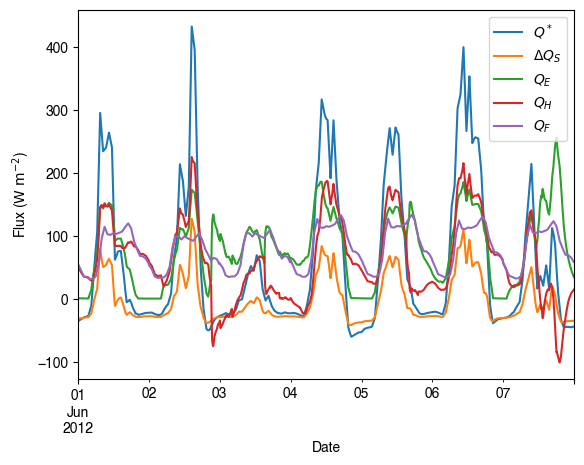
Plotting is straightforward using pandas’ built-in .plot() method. Here we examine surface energy balance for one week in June:
3.1.1.6.4.2. Basic example#
Plotting is very straightforward via the .plot method bounded with pandas.DataFrame. Note the usage of loc for two slices of the output DataFrame.
[22]:
# a dict for better display variable names
dict_var_disp = {
    "QN": "$Q^*$",
    "QS": r"$\Delta Q_S$",
    "QE": "$Q_E$",
    "QH": "$Q_H$",
    "QF": "$Q_F$",
    "Kdown": r"$K_{\downarrow}$",
    "Kup": r"$K_{\uparrow}$",
    "Ldown": r"$L_{\downarrow}$",
    "Lup": r"$L_{\uparrow}$",
    "Rain": "$P$",
    "Irr": "$I$",
    "Evap": "$E$",
    "RO": "$R$",
    "TotCh": "$\Delta S$",
}
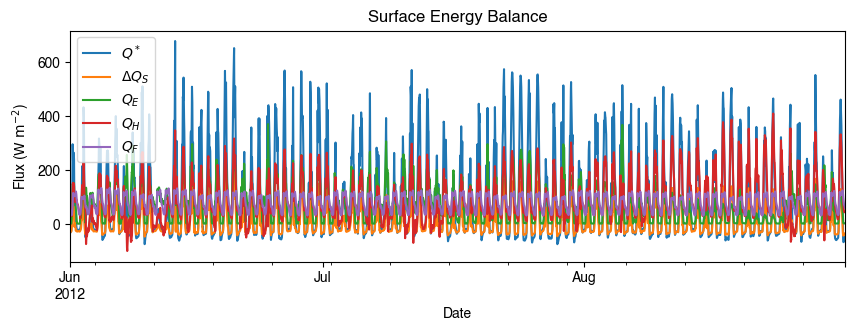
3.1.1.6.4.3. Complete Summer Analysis#
Let’s examine the full summer period (June-August) urban energy balance:
[23]:
ax_output = (
    df_output_suews.loc[grid]
    .loc["2012 6 1":"2012 6 7", ["QN", "QS", "QE", "QH", "QF"]]
    .rename(columns=dict_var_disp)
    .plot()
)
_ = ax_output.set_xlabel("Date")
_ = ax_output.set_ylabel("Flux ($ \mathrm{W \ m^{-2}}$)")
_ = ax_output.legend()
3.1.1.6.4.4. More examples#
Below is a more complete example for examination of urban energy balance over the whole summer (June to August).
[24]:
# energy balance
ax_output = (
    df_output_suews.loc[grid]
    .loc["2012 6":"2012 8", ["QN", "QS", "QE", "QH", "QF"]]
    .rename(columns=dict_var_disp)
    .plot(
        figsize=(10, 3),
        title="Surface Energy Balance",
    )
)
_ = ax_output.set_xlabel("Date")
_ = ax_output.set_ylabel("Flux ($ \mathrm{W \ m^{-2}}$)")
_ = ax_output.legend()
3.1.1.6.5. Temporal Resampling#
SUEWS typically runs at 5-minute intervals, producing large datasets. Resampling to hourly or daily values improves analysis performance and reveals temporal patterns:
[25]:
rsmp_1d = df_output_suews.loc[grid].resample("1d")
# daily mean values
df_1d_mean = rsmp_1d.mean()
# daily sum values
df_1d_sum = rsmp_1d.sum()
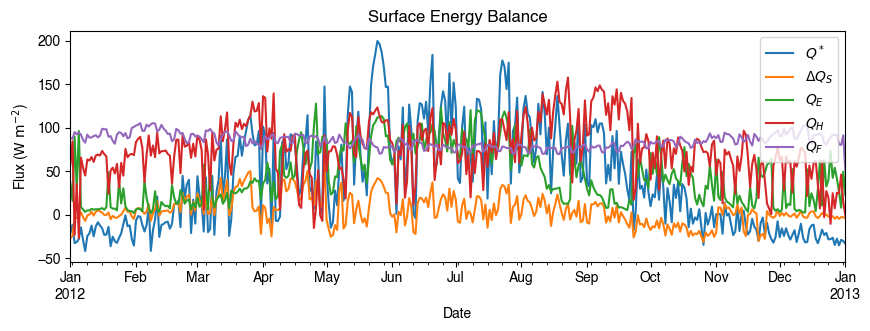
3.1.1.6.5.1. Daily Mean Energy Balance#
Using daily averages makes plotting faster and reveals seasonal patterns:
[26]:
# energy balance
ax_output = (
    df_1d_mean.loc[:, ["QN", "QS", "QE", "QH", "QF"]]
    .rename(columns=dict_var_disp)
    .plot(
        figsize=(10, 3),
        title="Surface Energy Balance",
    )
)
_ = ax_output.set_xlabel("Date")
_ = ax_output.set_ylabel("Flux ($ \mathrm{W \ m^{-2}}$)")
_ = ax_output.legend()
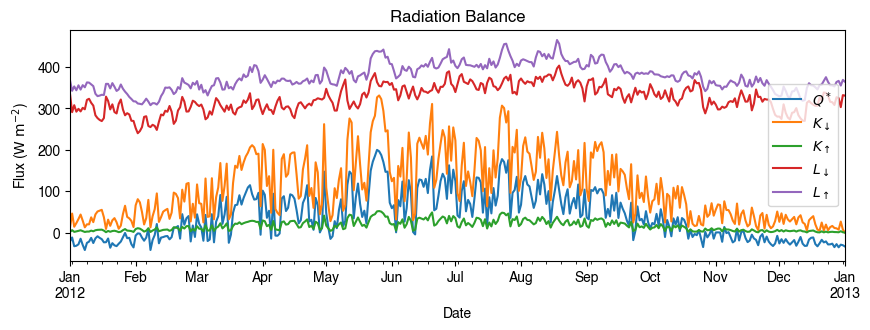
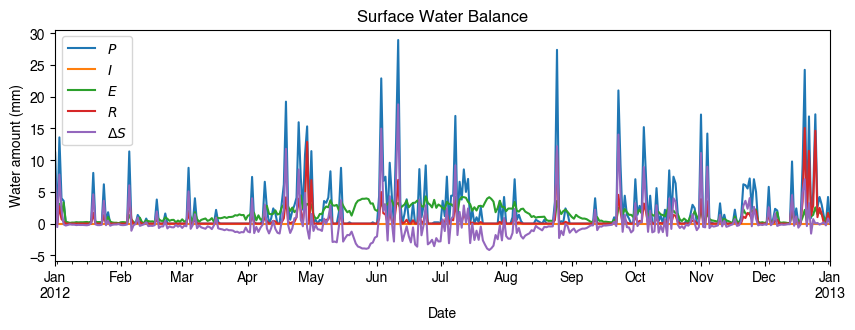
3.1.1.6.5.2. Multi-Component Analysis#
Using the resampled data, we can examine both energy and water balance components:
[27]:
# radiation balance
ax_output = (
    df_1d_mean.loc[:, ["QN", "Kdown", "Kup", "Ldown", "Lup"]]
    .rename(columns=dict_var_disp)
    .plot(
        figsize=(10, 3),
        title="Radiation Balance",
    )
)
_ = ax_output.set_xlabel("Date")
_ = ax_output.set_ylabel("Flux ($ \mathrm{W \ m^{-2}}$)")
_ = ax_output.legend()
[28]:
# water balance
ax_output = (
    df_1d_sum.loc[:, ["Rain", "Irr", "Evap", "RO", "TotCh"]]
    .rename(columns=dict_var_disp)
    .plot(
        figsize=(10, 3),
        title="Surface Water Balance",
    )
)
_ = ax_output.set_xlabel("Date")
_ = ax_output.set_ylabel("Water amount (mm)")
_ = ax_output.legend()
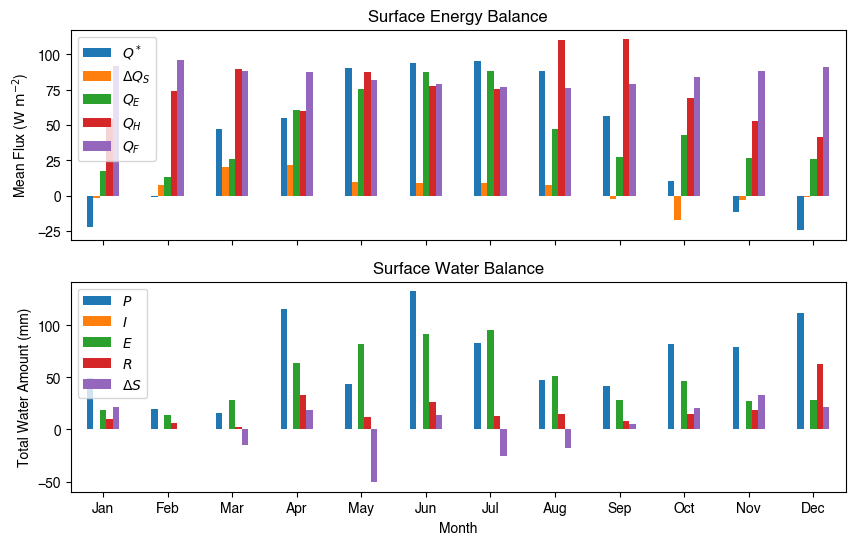
3.1.1.6.5.3. Monthly Patterns#
Get an overview of seasonal energy and water balance patterns:
[29]:
# get a monthly Resampler
df_plot = df_output_suews.loc[grid].copy()
df_plot.index = df_plot.index.set_names("Month")
rsmp_1M = df_plot.shift(-1).dropna(how="all").resample("1M", kind="period")
# mean values
df_1M_mean = rsmp_1M.mean()
# sum values
df_1M_sum = rsmp_1M.sum()
[33]:
# month names
name_mon = [x.strftime("%b") for x in rsmp_1M.groups]
# create subplots showing two panels together
fig, axes = plt.subplots(2, 1, sharex=True)
# surface energy balance
_ = (
    df_1M_mean.loc[:, ["QN", "QS", "QE", "QH", "QF"]]
    .rename(columns=dict_var_disp)
    .plot(
        ax=axes[0],  # specify the axis for plotting
        figsize=(10, 6),  # specify figure size
        title="Surface Energy Balance",
        kind="bar",
    )
)
# surface water balance
_ = (
    df_1M_sum.loc[:, ["Rain", "Irr", "Evap", "RO", "TotCh"]]
    .rename(columns=dict_var_disp)
    .plot(
        ax=axes[1],  # specify the axis for plotting
        title="Surface Water Balance",
        kind="bar",
    )
)

# annotations
_ = axes[0].set_ylabel("Mean Flux ($ \mathrm{W \ m^{-2}}$)")
_ = axes[0].legend()
_ = axes[1].set_xlabel("Month")
_ = axes[1].set_ylabel("Total Water Amount (mm)")
_ = axes[1].xaxis.set_ticklabels(name_mon, rotation=0)
_ = axes[1].legend()
3.1.1.6.6. Saving Results#
SuPy provides convenient functions to save output in various formats for further analysis:
The SUEWSSimulation.save() function exports results to standard text files compatible with other analysis tools:
[34]:
df_output
[34]:
| group | BEERS | ... | SUEWS | |||||||||||||||||||
|---|---|---|---|---|---|---|---|---|---|---|---|---|---|---|---|---|---|---|---|---|---|---|
| var | azimuth | altitude | GlobalRad | DiffuseRad | DirectRad | Kdown2d | Kup2d | Ksouth | Kwest | Knorth | ... | Ts_Grass | Ts_BSoil | Ts_Water | Ts_Paved_dyohm | Ts_Bldgs_dyohm | Ts_EveTr_dyohm | Ts_DecTr_dyohm | Ts_Grass_dyohm | Ts_BSoil_dyohm | Ts_Water_dyohm | |
| grid | datetime | |||||||||||||||||||||
| 1 | 2012-01-01 00:05:00 | 0.931142 | -61.632826 | 0.16 | 0.0 | 0.0 | 0.0 | 0.0 | 0.0 | 0.0 | 0.0 | ... | 12.870186 | 12.864744 | 12.862176 | 10.900448 | 10.972911 | 10.972911 | 10.972911 | 10.972911 | 10.972911 | 10.972911 |
| 2012-01-01 00:10:00 | 3.347077 | -61.603569 | 0.16 | 0.0 | 0.0 | 0.0 | 0.0 | 0.0 | 0.0 | 0.0 | ... | 12.878201 | 12.872726 | 12.870134 | 10.818824 | 10.818380 | 10.918016 | 10.918016 | 10.858234 | 10.877112 | 10.877112 | |
| 2012-01-01 00:15:00 | 5.756736 | -61.541631 | 0.16 | 0.0 | 0.0 | 0.0 | 0.0 | 0.0 | 0.0 | 0.0 | ... | 12.869776 | 12.864282 | 12.861666 | 10.741024 | 10.678091 | 10.865010 | 10.865010 | 10.751578 | 10.786983 | 10.786983 | |
| 2012-01-01 00:20:00 | 8.155703 | -61.447237 | 0.16 | 0.0 | 0.0 | 0.0 | 0.0 | 0.0 | 0.0 | 0.0 | ... | 12.853404 | 12.847896 | 12.845258 | 10.666848 | 10.550664 | 10.813818 | 10.813818 | 10.652340 | 10.702157 | 10.702157 | |
| 2012-01-01 00:25:00 | 10.539714 | -61.320723 | 0.16 | 0.0 | 0.0 | 0.0 | 0.0 | 0.0 | 0.0 | 0.0 | ... | 12.833235 | 12.827717 | 12.825055 | 10.596105 | 10.434849 | 10.764369 | 10.764369 | 10.559964 | 10.622291 | 10.622291 | |
| ... | ... | ... | ... | ... | ... | ... | ... | ... | ... | ... | ... | ... | ... | ... | ... | ... | ... | ... | ... | ... | ... | |
| 2012-12-31 23:40:00 | 348.749128 | -61.223782 | 0.00 | 0.0 | 0.0 | 0.0 | 0.0 | 0.0 | 0.0 | 0.0 | ... | 10.199067 | 10.818435 | 10.898584 | 6.309914 | 2.748652 | 9.184894 | 9.184894 | 3.743662 | 4.834199 | 4.834199 | |
| 2012-12-31 23:45:00 | 351.124899 | -61.359370 | 0.00 | 0.0 | 0.0 | 0.0 | 0.0 | 0.0 | 0.0 | 0.0 | ... | 10.185470 | 10.795352 | 10.873958 | 6.308790 | 2.747566 | 9.183812 | 9.183812 | 3.742610 | 4.833165 | 4.833165 | |
| 2012-12-31 23:50:00 | 353.516761 | -61.463000 | 0.00 | 0.0 | 0.0 | 0.0 | 0.0 | 0.0 | 0.0 | 0.0 | ... | 10.171681 | 10.772212 | 10.849304 | 6.307717 | 2.746568 | 9.182768 | 9.182768 | 3.741625 | 4.832188 | 4.832188 | |
| 2012-12-31 23:55:00 | 355.920524 | -61.534305 | 0.00 | 0.0 | 0.0 | 0.0 | 0.0 | 0.0 | 0.0 | 0.0 | ... | 10.135518 | 10.721713 | 10.796548 | 6.306691 | 2.745648 | 9.181761 | 9.181761 | 3.740701 | 4.831263 | 4.831263 | |
| 2013-01-01 00:00:00 | 358.339872 | -61.573100 | 0.00 | 0.0 | 0.0 | 0.0 | 0.0 | 0.0 | 0.0 | 0.0 | ... | 10.110590 | 10.685309 | 10.758330 | 6.305708 | 2.744798 | 9.180787 | 9.180787 | 3.739834 | 4.830386 | 4.830386 | |
105408 rows × 1036 columns
[36]:
# Save using OOP approach
list_path_save = sim_sample.save("output/")
3.1.1.7. Next Steps#
Congratulations! You’ve completed your first SUEWS urban climate simulation. Here’s where to go next:
3.1.1.7.1. Advanced Tutorials#
Setup Your Own Site: Configure SUEWS for your research location
Impact Studies: Climate change and scenario analysis
3.1.1.7.2. Configuration and Data#
Data Structures Guide: Detailed input/output documentation
YAML Configuration: Modern parameter management
Command-line wizard: A configuration wizard tool is in development
3.1.1.7.3. ️ Urban Climate Science#
Physical Principles: Understanding SUEWS physics
Recent Publications: Latest SUEWS research applications
3.1.1.7.4. Key Concepts You’ve Learned#
Loading sample data for immediate simulation
Running SUEWS urban climate simulations
Understanding energy balance components (QN, QH, QE, QS, QF)
Data analysis with pandas integration
Visualization and temporal resampling
Saving results for further analysis
3.1.1.7.5. Real Research Applications#
This tutorial used sample data, but SuPy enables sophisticated urban climate research: - Urban heat island studies across different cities - Climate change impact assessment for urban areas - Building energy modeling integration - Multi-site comparative studies with parallel processing - Policy scenario analysis for urban planning
Ready to apply SUEWS to your research? Start with Setup Your Own Site!
[37]:
# Display saved files
for file_out in list_path_save:
    print(f" {file_out.name}")

print("\n Congratulations! You've completed your first SUEWS simulation.")
print(" Results saved in multiple formats for further analysis.")
print(" Ready for more advanced applications!")
 KCL1_2012_SUEWS_60.txt
 df_state_KCL.csv

 Congratulations! You've completed your first SUEWS simulation.
 Results saved in multiple formats for further analysis.
 Ready for more advanced applications!