

Tip
Need help? Please let us know in the SUEWS Community.
Please report issues with the manual on GitHub Issues (or use Report Issue for This Page for page-specific feedback).
Please cite SUEWS with proper information from our Zenodo page.
Note
Go to the end to download the full example code.
3.1. SUEWS Quick Start Tutorial#
Essential SUEWS workflow using the modern SuPy (Python) interface.
This tutorial demonstrates the complete workflow for running urban climate simulations with SUEWS:
Load sample data
Run simulation
Explore results (statistics, plotting, resampling)
What is SUEWS?
SUEWS (Surface Urban Energy and Water Balance Scheme) is an urban climate model that simulates energy and water fluxes in urban environments. SuPy is the modern Python interface that provides powerful data analysis capabilities and seamless integration with the scientific Python ecosystem.
import matplotlib.pyplot as plt
import pandas as pd

from supy import SUEWSSimulation
3.1.1. Load Sample Data#
SuPy includes built-in sample data to get you started immediately. Load sample data for the simulation using the modern OOP API.
sim = SUEWSSimulation.from_sample_data()

print("Sample data loaded successfully!")
print(f"Grid ID: {sim.state_init.index[0]}")
print(f"Forcing period: {sim.forcing.time_range}")
print(f"Time steps: {len(sim.forcing)}")
Sample data loaded successfully!
Grid ID: 1
Forcing period: (Timestamp('2012-01-01 00:05:00'), Timestamp('2013-01-01 00:00:00'))
Time steps: 105408
3.1.2. Understanding Input Data#
SUEWS requires two main input datasets:
state_init: Initial conditions and site configurationforcing: Meteorological forcing data (time series)
Access these through the simulation object’s properties.
# Surface characteristics: building and tree heights
print("Building and tree heights:")
print(sim.state_init.loc[:, ["bldgh", "evetreeh", "dectreeh"]])

# Surface fractions by land cover type
print("\nSurface fractions:")
print(sim.state_init.filter(like="sfr_surf"))
Building and tree heights:
var     bldgh evetreeh dectreeh
ind_dim     0        0        0
grid
1        22.0     13.1     13.1

Surface fractions:
var     sfr_surf
ind_dim     (0,)  (1,) (2,)  (3,)  (4,) (5,)  (6,)
grid
1           0.43  0.38  0.0  0.02  0.03  0.0  0.14
3.1.3. Visualise Forcing Data#
The forcing data drives the simulation. Access forcing variables directly
as attributes of sim.forcing.
# Access forcing variables through the OOP interface
print("\nForcing data summary:")
print(f"  Air temperature range: {sim.forcing.Tair.min():.1f} to {sim.forcing.Tair.max():.1f} C")
print(f"  Wind speed range: {sim.forcing.U.min():.1f} to {sim.forcing.U.max():.1f} m/s")
print(f"  Total rainfall: {sim.forcing.rain.sum():.1f} mm")

# Slice forcing data by time (returns new SUEWSForcing object).
# Drop the first row with `.iloc[1:]` because accumulated variables
# (e.g. rainfall) for the partial period at the slice boundary are
# incomplete, making that row invalid as forcing input.
forcing_sliced = sim.forcing["2012-01":"2012-03"].iloc[1:]

# Update simulation with the time-sliced forcing
sim.update_forcing(forcing_sliced)

# Plot key meteorological variables
list_var_forcing = ["kdown", "Tair", "RH", "pres", "U", "rain"]
dict_var_label = {
    "kdown": r"Incoming Solar Radiation ($\mathrm{W\ m^{-2}}$)",
    "Tair": r"Air Temperature ($^\circ$C)",
    "RH": "Relative Humidity (%)",
    "pres": "Air Pressure (hPa)",
    "rain": "Rainfall (mm)",
    "U": r"Wind Speed ($\mathrm{m\ s^{-1}}$)",
}
Forcing data summary:
  Air temperature range: -5.7 to 28.8 C
  Wind speed range: 0.2 to 11.2 m/s
  Total rainfall: 821.0 mm
Tip
When resampling forcing data, call resample() first, then select
columns. SUEWSForcing.resample() applies the correct
aggregation method for each variable type (rain=sum, radiation=mean,
instantaneous=last). Selecting columns first bypasses this logic.
# Resample to hourly for cleaner plots
df_plot_forcing = forcing_sliced.resample("1h")[list_var_forcing]

fig, axes = plt.subplots(6, 1, figsize=(10, 12), sharex=True)
for ax, var in zip(axes, list_var_forcing):
    df_plot_forcing[var].plot(ax=ax, legend=False)
    ax.set_ylabel(dict_var_label[var])
fig.tight_layout()

3.1.4. Modify Input Parameters#
Modify surface parameters using the update_config method.
This is the recommended approach for parameter changes.
# View original surface fractions
print("Original surface fractions:")
print(sim.state_init.loc[:, "sfr_surf"])

# Modify surface fractions using update_config
sim.update_config({"initial_states": {"sfr_surf": [0.1, 0.1, 0.2, 0.3, 0.25, 0.05, 0]}})

print("\nModified surface fractions:")
print(sim.state_init.loc[:, "sfr_surf"])
Original surface fractions:
ind_dim  (0,)  (1,)  (2,)  (3,)  (4,)  (5,)  (6,)
grid
1        0.43  0.38   0.0  0.02  0.03   0.0  0.14

Modified surface fractions:
ind_dim  (0,)  (1,)  (2,)  (3,)  (4,)  (5,)  (6,)
grid
1        0.43  0.38   0.0  0.02  0.03   0.0  0.14
3.1.5. Run Simulation#
With forcing data and initial conditions ready, run the SUEWS simulation.
The run() method returns a SUEWSOutput object for convenient access.
output = sim.run()

print(f"Simulation complete: {len(output.times)} timesteps")
print(f"Output groups: {output.groups}")
print(f"Grids: {output.grids}")
Simulation complete: 26206 timesteps
Output groups: ['BEERS', 'DailyState', 'debug', 'EHC', 'NHood', 'RSL', 'snow', 'SPARTACUS', 'STEBBS', 'SUEWS']
Grids: [1]
3.1.6. Explore Results: Statistics#
Access output variables directly as attributes of the output object. Use pandas’ built-in methods for quick statistical summaries.
# Access energy balance variables via SUEWS output group
df_suews = output.SUEWS

print("Energy balance statistics:")
print(f"  Net radiation (QN): mean = {df_suews['QN'].mean():.1f} W/m2")
print(f"  Sensible heat (QH): mean = {df_suews['QH'].mean():.1f} W/m2")
print(f"  Latent heat (QE): mean = {df_suews['QE'].mean():.1f} W/m2")
print(f"  Storage heat (QS): mean = {df_suews['QS'].mean():.1f} W/m2")

# Detailed statistics
df_suews.loc[:, ["QN", "QS", "QH", "QE", "QF"]].describe()
Energy balance statistics:
  Net radiation (QN): mean = 10.8 W/m2
  Sensible heat (QH): mean = 70.3 W/m2
  Latent heat (QE): mean = 16.1 W/m2
  Storage heat (QS): mean = 16.2 W/m2
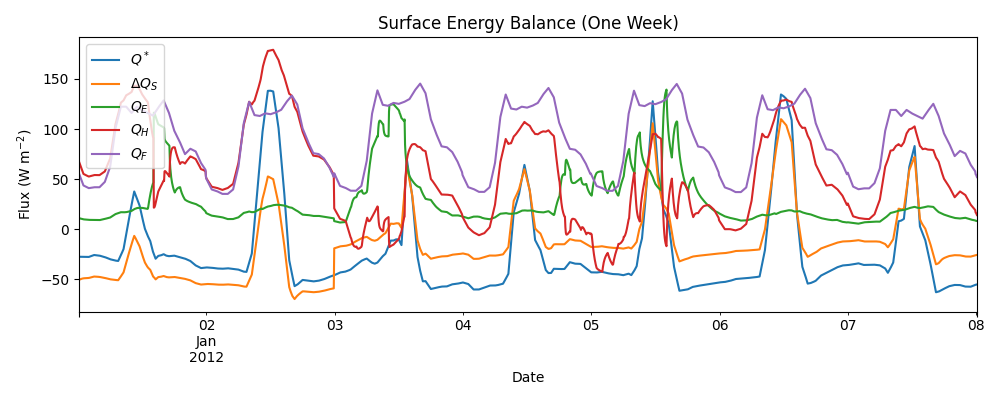
3.1.7. Explore Results: Weekly Energy Balance#
Plot the surface energy balance for one week to see diurnal patterns.
dict_var_disp = {
    "QN": r"$Q^*$",
    "QS": r"$\Delta Q_S$",
    "QE": "$Q_E$",
    "QH": "$Q_H$",
    "QF": "$Q_F$",
}

# Get grid ID for indexing
grid = output.grids[0]

# Select first week of available data for plotting
start_date = output.times[0]
end_date = start_date + pd.Timedelta(days=7)

fig, ax = plt.subplots(figsize=(10, 4))
(
    df_suews.loc[grid]
    .loc[start_date:end_date, ["QN", "QS", "QE", "QH", "QF"]]
    .rename(columns=dict_var_disp)
    .plot(ax=ax)
)
ax.set_xlabel("Date")
ax.set_ylabel(r"Flux ($\mathrm{W\ m^{-2}}$)")
ax.set_title("Surface Energy Balance (One Week)")
ax.legend()
plt.tight_layout()
3.1.8. Temporal Resampling: Daily Patterns#
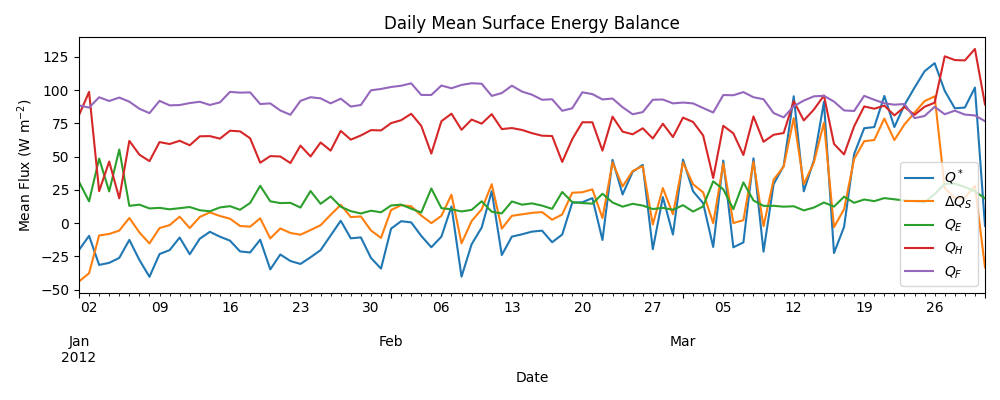
SUEWS runs at 5-minute intervals. Resampling to daily values reveals seasonal patterns.
rsmp_1d = df_suews.loc[grid].resample("1d")
df_1d_mean = rsmp_1d.mean()
df_1d_sum = rsmp_1d.sum()

# Plot daily mean energy balance
fig, ax = plt.subplots(figsize=(10, 4))
(
    df_1d_mean.loc[:, ["QN", "QS", "QE", "QH", "QF"]]
    .rename(columns=dict_var_disp)
    .plot(ax=ax)
)
ax.set_xlabel("Date")
ax.set_ylabel(r"Mean Flux ($\mathrm{W\ m^{-2}}$)")
ax.set_title("Daily Mean Surface Energy Balance")
ax.legend()
plt.tight_layout()
/private/tmp/claude/-Users-tingsun-conductor-workspaces-suews-havana-v1/41d4ccd2-265e-4416-b3db-fa0bcb209699/scratchpad/docs-worktree/docs/source/tutorials/tutorial_01_quick_start.py:202: Pandas4Warning: 'd' is deprecated and will be removed in a future version, please use 'D' instead.
  rsmp_1d = df_suews.loc[grid].resample("1d")
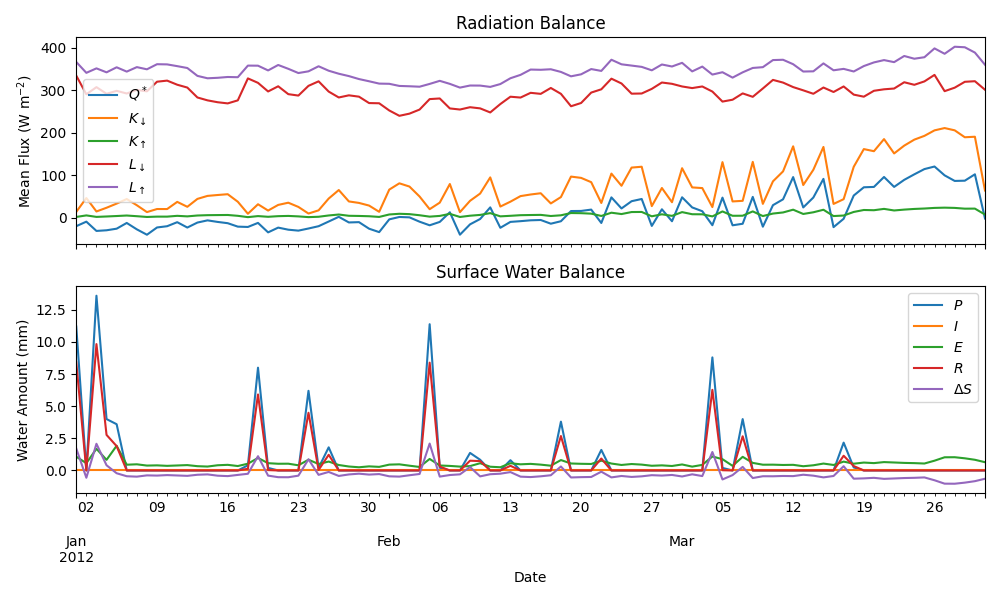
3.1.9. Radiation and Water Balance#
Examine radiation components and water balance using daily aggregates.
dict_var_disp_full = {
    "QN": r"$Q^*$",
    "Kdown": r"$K_{\downarrow}$",
    "Kup": r"$K_{\uparrow}$",
    "Ldown": r"$L_{\downarrow}$",
    "Lup": r"$L_{\uparrow}$",
    "Rain": "$P$",
    "Irr": "$I$",
    "Evap": "$E$",
    "RO": "$R$",
    "TotCh": r"$\Delta S$",
}

fig, axes = plt.subplots(2, 1, figsize=(10, 6), sharex=True)

# Radiation balance
(
    df_1d_mean.loc[:, ["QN", "Kdown", "Kup", "Ldown", "Lup"]]
    .rename(columns=dict_var_disp_full)
    .plot(ax=axes[0])
)
axes[0].set_ylabel(r"Mean Flux ($\mathrm{W\ m^{-2}}$)")
axes[0].set_title("Radiation Balance")
axes[0].legend()

# Water balance
(
    df_1d_sum.loc[:, ["Rain", "Irr", "Evap", "RO", "TotCh"]]
    .rename(columns=dict_var_disp_full)
    .plot(ax=axes[1])
)
axes[1].set_xlabel("Date")
axes[1].set_ylabel("Water Amount (mm)")
axes[1].set_title("Surface Water Balance")
axes[1].legend()

plt.tight_layout()
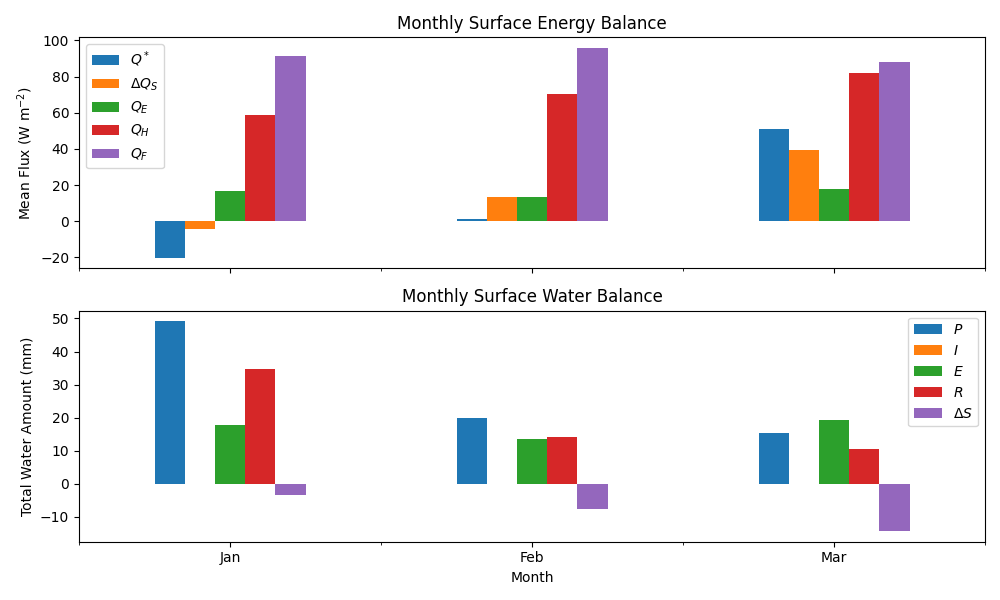
3.1.10. Monthly Patterns#
Aggregate to monthly values for seasonal overview using bar charts.
df_plot = df_suews.loc[grid].copy()
df_plot.index = df_plot.index.set_names("Month")
rsmp_1M = df_plot.shift(-1).dropna(how="all").resample("1ME")
df_1M_mean = rsmp_1M.mean()
df_1M_sum = rsmp_1M.sum()
# Convert index to period for better month display
df_1M_mean.index = df_1M_mean.index.to_period("M")
df_1M_sum.index = df_1M_sum.index.to_period("M")

# Month names for labels
name_mon = [x.strftime("%b") for x in rsmp_1M.groups]

fig, axes = plt.subplots(2, 1, sharex=True, figsize=(10, 6))

# Monthly energy balance
(
    df_1M_mean.loc[:, ["QN", "QS", "QE", "QH", "QF"]]
    .rename(columns=dict_var_disp)
    .plot(ax=axes[0], kind="bar")
)
axes[0].set_ylabel(r"Mean Flux ($\mathrm{W\ m^{-2}}$)")
axes[0].set_title("Monthly Surface Energy Balance")
axes[0].legend()

# Monthly water balance
(
    df_1M_sum.loc[:, ["Rain", "Irr", "Evap", "RO", "TotCh"]]
    .rename(columns=dict_var_disp_full)
    .plot(ax=axes[1], kind="bar")
)
axes[1].set_xlabel("Month")
axes[1].set_ylabel("Total Water Amount (mm)")
axes[1].set_title("Monthly Surface Water Balance")
axes[1].xaxis.set_ticklabels(name_mon, rotation=0)
axes[1].legend()

plt.tight_layout()
3.1.11. Summary#
This tutorial demonstrated the essential SUEWS workflow:
Load sample data using
from_sample_data()Run simulation with
run()which returnsSUEWSOutputExplore results using the OOP interface for intuitive variable access
Key concepts covered:
Energy balance components: Q*, QH, QE, QS, QF
Radiation balance: Kdown, Kup, Ldown, Lup
Water balance: Rain, Evap, Runoff, Storage change
Temporal resampling: 5-min to hourly, daily, monthly
Next steps:
Set Up SUEWS for Your Own Site - Configure SUEWS for your own site
tutorial_03_impact_studies - Sensitivity analysis and scenario modelling
Total running time of the script: (0 minutes 29.613 seconds)